How to Search the JoyaGoo Spreadsheet: Product Links, QC Photos and Seller Comparison
Learn how to search the JoyaGoo Spreadsheet, compare product links, review QC photos, evaluate sellers and filter outdated listings before ordering smarter.
GoGo Finder
4/28/20269 min read
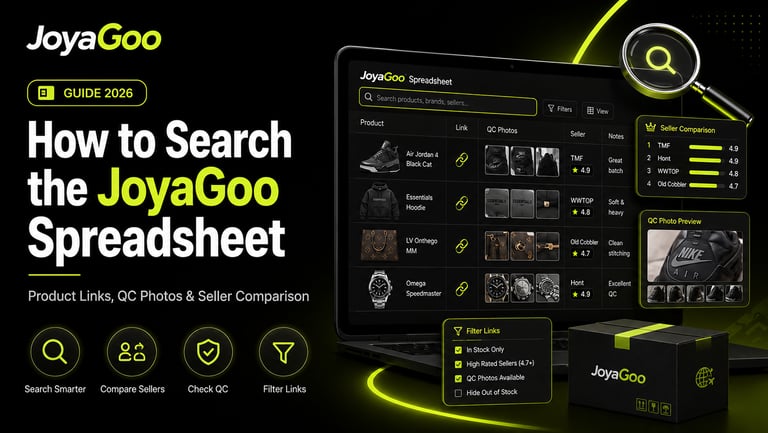
Searching the JoyaGoo Spreadsheet effectively requires more than entering a broad product name and opening the first result.
A reliable search process should help you identify the correct product type, confirm that the source link is still active, compare similar seller listings, review available QC evidence and remove options that no longer match your requirements.
This guide introduces a repeatable method for searching and filtering JoyaGoo product links. It is designed for users who want to move beyond random browsing and make faster, more structured comparisons before ordering through a China shopping agent.
Key Takeaways
Begin with a clear product specification rather than a broad category word.
Search using product type, material, color, fit, size and intended use.
Confirm that every live listing still matches the spreadsheet entry.
Compare sellers and product versions on the same criteria.
Treat earlier QC photos as research references, not guarantees.
Calculate value using product price, domestic delivery and parcel impact.
Remove listings with unclear variations, outdated links or inconsistent information.
Use a short screening process before spending time on detailed comparison.
Why Broad Searches Produce Weak Results
A broad search such as “shoes,” “hoodie” or “bag” may return many products, but it does not tell the spreadsheet what kind of result you actually need.
The broader the query, the more time you must spend removing:
Incorrect product types
Unwanted colors
Unsuitable materials
Wrong fits
Incompatible sizes
Different price levels
Outdated links
Similar-looking but unrelated products
A stronger search starts with a defined requirement.
Instead of searching for a general category, describe the product through several attributes:
Product type + style or construction + material + color + size or fit + budget
For example: heavyweight zip hoodie black oversized
is more useful than: hoodie
The goal is not always to create the longest possible search phrase. The goal is to include the terms that separate acceptable products from irrelevant ones.
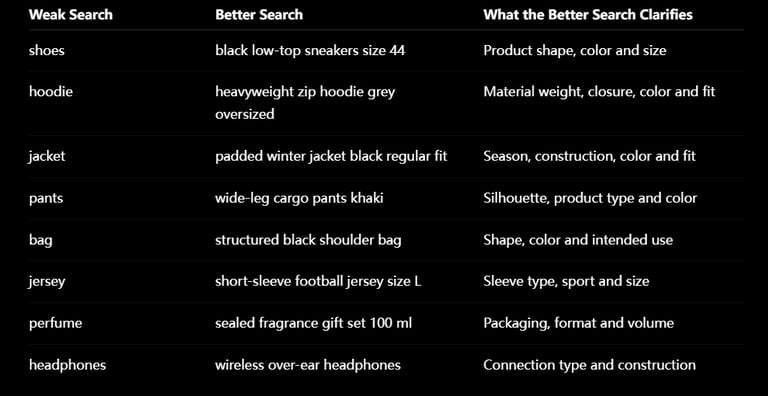
Weak Search vs Better Search
These examples should be adapted to the terms used in the live product listing. Sellers may describe the same product differently, so it is useful to try closely related words when the first query is too narrow.
Step 1: Define the Product Before Searching
Before opening the JoyaGoo Spreadsheet, write down the minimum requirements your product must meet.
A practical search brief may include:
Product category
Intended use
Preferred color
Required measurements
Material preference
Fit or silhouette
Essential features
Maximum product budget
Acceptable parcel weight
Shipping restrictions
For clothing, the requirement might be:
Black heavyweight hoodie, loose fit, minimum chest width of 60 cm and no large back graphic.
For a bag, it might be:
Structured shoulder bag, black hardware, width between 25 and 30 cm and adjustable strap.
This prevents the search from becoming a collection of attractive but unsuitable products.
Step 2: Start With the Correct Category
Categories are useful for reducing the initial search area, but they should not be your final filter.
The JoyaGoo Spreadsheet may organize links into groups such as:
Sneakers
T-shirts
Hoodies and sweaters
Jackets
Pants and shorts
Bags
Headwear
Accessories
Jerseys
Electronics
Perfume
Other products
After selecting a category, filter according to the attributes that matter for that specific product type.
For Clothing
Prioritize:
Measurements
Fit
Fabric
Weight
Print or embroidery
Closure type
For Sneakers
Prioritize:
Exact model
Size
Insole measurement
Shape
Materials
Box requirements
For Bags
Prioritize:
Dimensions
Structure
Hardware
Strap length
Interior layout
Packaging
For Electronics or Perfume
Prioritize:
Product specifications
Battery or liquid status
Packaging
Destination compatibility
Available shipping routes
Category browsing should reduce irrelevant results. Product attributes should determine the final shortlist.
Step 3: Check Whether the Product Link Is Still Accurate
A spreadsheet entry may remain visible even after the source listing changes.
Before evaluating quality or price, open the live product page and confirm:
The page still loads
The displayed product is the same item
The main image has not been replaced
The required color remains available
The correct size or version can be selected
The displayed price matches the intended variation
The seller still accepts orders
Domestic shipping information is visible
The listing has not become a deposit or accessory-only option
A product link should be removed from your shortlist when the live page no longer matches the spreadsheet description.
Warning Signs of a Changed Listing
Common signs include:
A completely different main image
An unusually low starting price
Only one unrelated variation remains
The product title no longer matches
Required sizes are unavailable
The listing redirects to another page
The seller has replaced the item with an accessory
Product specifications are missing
Do not assume that the spreadsheet price or thumbnail is still current. The live seller page is the final source for the version being ordered.
Step 4: Separate the Product Link, Seller and Batch
A common search mistake is treating the product link, seller and production version as the same thing.
They are different layers of the purchasing decision.
Product Link
The product link identifies one marketplace listing. It may contain several colors, sizes, materials or versions.
Seller
The seller manages the listing and dispatches the item to the agent warehouse. One seller may offer several quality levels or source products from different factories.
Batch or Version
A batch or version refers to the actual production option. Different versions may vary in construction, material, shape, packaging and price.
When comparing two links, ask:
Are they selling the same version?
Are the included accessories identical?
Do both prices refer to the complete product?
Are the materials described in the same way?
Is the seller using the same size chart?
Do the earlier QC examples appear consistent?
A lower price only matters when the products being compared are genuinely equivalent.
Step 5: Evaluate the Seller Without Relying on One Signal
A familiar seller name or polished store page does not automatically make every listing reliable.
Evaluate seller consistency through several signals:
Does the store focus on the relevant product category?
Does the product page contain usable specifications?
Are variations clearly separated?
Is the size chart complete?
Does the price make sense compared with similar listings?
Are previous product examples reasonably consistent?
Does the seller appear to maintain the listing?
Are important conditions explained before purchase?
Avoid judging a seller only by:
Store popularity
Promotional language
One successful order
One attractive QC set
A high price
A low price
A useful seller comparison is based on repeatable evidence, not reputation alone.
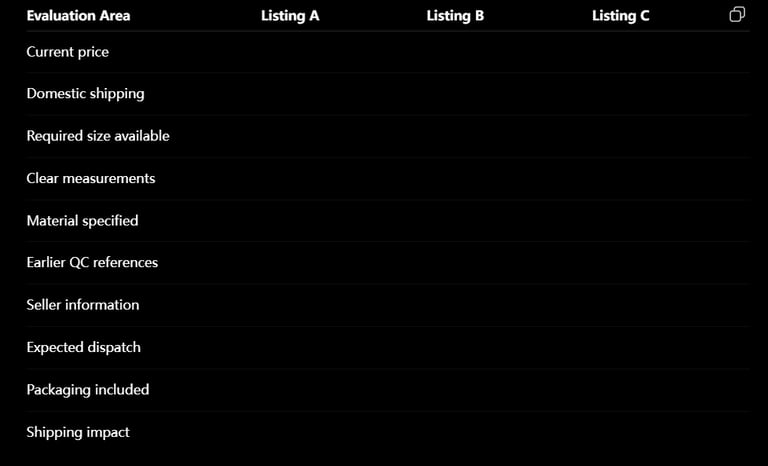
Seller Comparison Table
Create a simple comparison before ordering:
This prevents a visually appealing listing from winning simply because it was opened first.
Step 6: Use QC Photos as a Verification Layer
JoyaGoo states that after a seller sends the item to its warehouse, the product is inspected and warehouse photos are added to the order for review. Its current guidance also says eligible return or exchange requests generally need to be submitted within five days after QC completion.
QC photos should therefore be used at two different stages.
Earlier QC References
Earlier QC images can help you research:
General product shape
Common material appearance
Typical packaging
Repeated manufacturing details
Possible sizing patterns
Common visible defects
These images help decide whether a listing deserves further consideration.
Your Own Warehouse QC Photos
The photos of your own item are more important because they show the specific product received for your order.
Check:
Correct color
Correct size
Correct variation
Front and back views
Side profiles
Product measurements
Material appearance
Stitching
Hardware
Logos or graphics
Visible stains or damage
Included accessories
Packaging condition
Earlier QC photos do not guarantee that a later order will be identical. Sellers may change inventory, factories, materials or production runs.
Step 7: Compare Price as Total Value
The cheapest product link is not always the lowest-cost choice.
A more accurate comparison includes:
Product price
+ Chinese domestic delivery
+ optional services
+ return or exchange costs
+ expected international shipping impact
JoyaGoo’s current fee guidance explains that buyers pay the seller’s product and domestic-shipping charges, while optional services such as additional QC photos may create separate costs.
Questions to Ask Before Choosing the Cheapest Listing
Is the lowest displayed price attached to the correct variation?
Does the cheaper version use different materials?
Is packaging excluded?
Is domestic delivery higher?
Are measurements less complete?
Is the seller less consistent?
Will the product require an avoidable return?
Is it unusually heavy or bulky?
A product that saves a small amount at checkout but creates sizing problems or excessive parcel volume may offer weaker overall value.
Step 8: Filter Out Outdated or Unreliable Listings
A spreadsheet becomes more useful when weak results are removed early.
Exclude or reconsider a listing when:
The source page is unavailable
The product has been replaced
The requested variation is missing
The price is misleading
Measurements are absent
Seller information is unclear
The product description conflicts with the images
QC examples appear to show different versions
The listing has no usable product details
Shipping eligibility is uncertain
Do not spend the same amount of research time on every result.
Use a fast first filter to remove obvious problems, then compare only the strongest remaining options.
The Five-Minute Screening Workflow
Use this process for every promising spreadsheet result.
Minute 1: Confirm the Live Listing
Check the product, price, seller and available variations.
Minute 2: Confirm Fit or Specifications
Review measurements, dimensions, material, model or technical requirements.
Minute 3: Check Earlier Evidence
Look for relevant QC examples, seller consistency and repeated product details.
Minute 4: Compare One Alternative
Open at least one similar listing and compare price, specifications and evidence.
Minute 5: Check Parcel Practicality
Estimate weight, packaging, shipping restrictions and whether the product improves the planned parcel.
After five minutes, classify the result as:
Shortlist
Needs more research
Remove
This simple classification is faster than repeatedly reopening uncertain links.
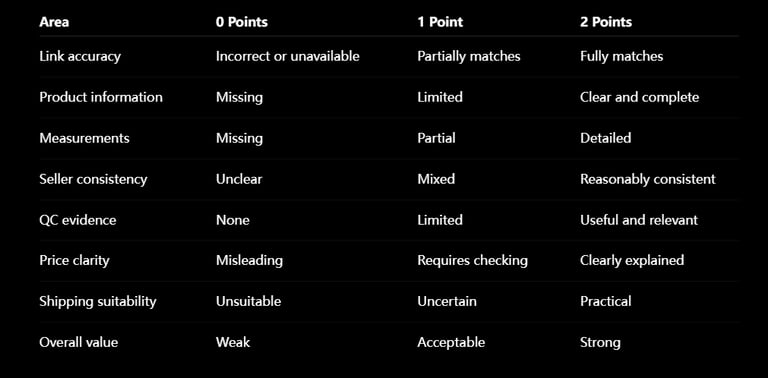
JoyaGoo Spreadsheet Product Scorecard
A basic scoring system can make comparisons more consistent.
Score each area from 0 to 2:
A high score does not guarantee quality. It indicates that the listing provides enough information to support a better-informed decision.
Common JoyaGoo Spreadsheet Search Mistakes
Searching Only by a Brand or Category
Broad terms return too many unrelated products.
Opening Only the First Result
Result order does not prove that the first listing is the best option.
Comparing Different Versions as if They Were Identical
A lower-priced product may represent another material, package or batch.
Trusting an Old Screenshot More Than the Live Listing
Marketplace prices, inventory and variations can change.
Ignoring Measurements
Size labels are not reliable substitutes for actual garment or product dimensions.
Treating QC as Authentication
Warehouse QC photos help identify visible details and problems. They do not authenticate products or guarantee materials and long-term durability.
Choosing by Product Price Alone
Domestic delivery, returns, parcel weight and shipping eligibility can change the real cost.
How We Evaluate JoyaGoo Spreadsheet Listings
Our editorial screening method considers:
Current link availability
Match between the spreadsheet entry and live listing
Clarity of product specifications
Seller consistency
Measurement quality
Availability of useful QC references
Price transparency
Category relevance
Shipping practicality
Inclusion in the JoyaGoo Spreadsheet is a discovery signal, not a guarantee of quality, authenticity, inventory, seller performance or international delivery.
Frequently Asked Questions
How do I search the JoyaGoo Spreadsheet more effectively?
Start with the product category, then add the attributes that matter most, such as material, color, fit, measurements, version or intended use.
What should I do when a JoyaGoo product link is unavailable?
Search for the same product description, check the seller’s store for a replacement listing or compare alternative links in the same category. Do not order through a page that no longer matches the spreadsheet entry.
How many listings should I compare?
Two or three closely matched listings are usually more useful than opening many unrelated options. Compare the same product type, size, material and included packaging.
Are earlier QC photos enough to approve a product?
No. Earlier QC photos are research references. Review the warehouse photos of the specific item received for your order before international shipping.
How can I tell whether the displayed price is accurate?
Select the intended size, color and version on the live page. Some listings display the lowest-priced accessory, deposit or basic variation as the starting price.
Does a trusted seller guarantee every listing?
No. Sellers may offer different factories, versions and quality levels. Evaluate the individual product listing and your own QC photos.
Should I always choose the listing with the most QC photos?
Not automatically. Relevance and consistency matter more than quantity. Confirm that the photos show the same product and version being considered.
What is the most important search filter?
The most important filter depends on the category. Measurements are critical for clothing, dimensions for bags, sizing and construction for footwear, and specifications or shipping eligibility for electronics and liquids.
Final Thoughts
The JoyaGoo Spreadsheet becomes more useful when it is treated as a structured search and comparison system rather than a list of products to buy immediately.
Begin with a clear product requirement. Search with meaningful attributes, verify the live link, separate the seller from the product version, compare similar listings and use QC photos as a final verification layer.
This process reduces irrelevant browsing and helps identify product links that provide enough information, evidence and shipping practicality to deserve a place in your shortlist.
The objective is not to find the largest number of JoyaGoo links. It is to remove weak options quickly and make a better-informed decision from the strongest remaining results.
Recommended Links
→ Read the Complete JoyaGoo Spreadsheet Guide
→ Explore the Best JoyaGoo Spreadsheet Finds by Category
→ Browse the Full JoyaGoo Spreadsheet
→ Avoid Common JoyaGoo Buying Mistakes
→ Explore More JoyaGoo Spreadsheet Guides and News
Independent Disclaimer: JoyaGoo Spreadsheet is an independent product-discovery and informational resource. It does not manufacture, sell, inspect, store or ship products and is not affiliated with JoyaGoo, Weidian, Taobao, 1688, Tmall or any featured brand. Product links, prices, seller information, QC results, inventory and shipping options may change.